With the advancements in AI, there have been a lot of problems that have seen ideas from statistics and math applied to them. One of them is retrieval.
We can broadly look at retrieval as:
- same modal retrieval
- cross modal retrieval
What I want to discuss today is different ways we can embed information in a vector space from one modality and use a different modality to access that information.
And as always, in the end, we’ll make a retrieval system for text-to-image using CLIP Vision Transformer and lancedb vector database.
the idea
We will use the term “modality” to represent one format of information storage. For example: text.
But it’s helpful to not use terms like text-to-image because these ideas are broader than just texts and images.
For example, you can use these same ideas on RGB vs optical images in satellites.
So what happens is this:
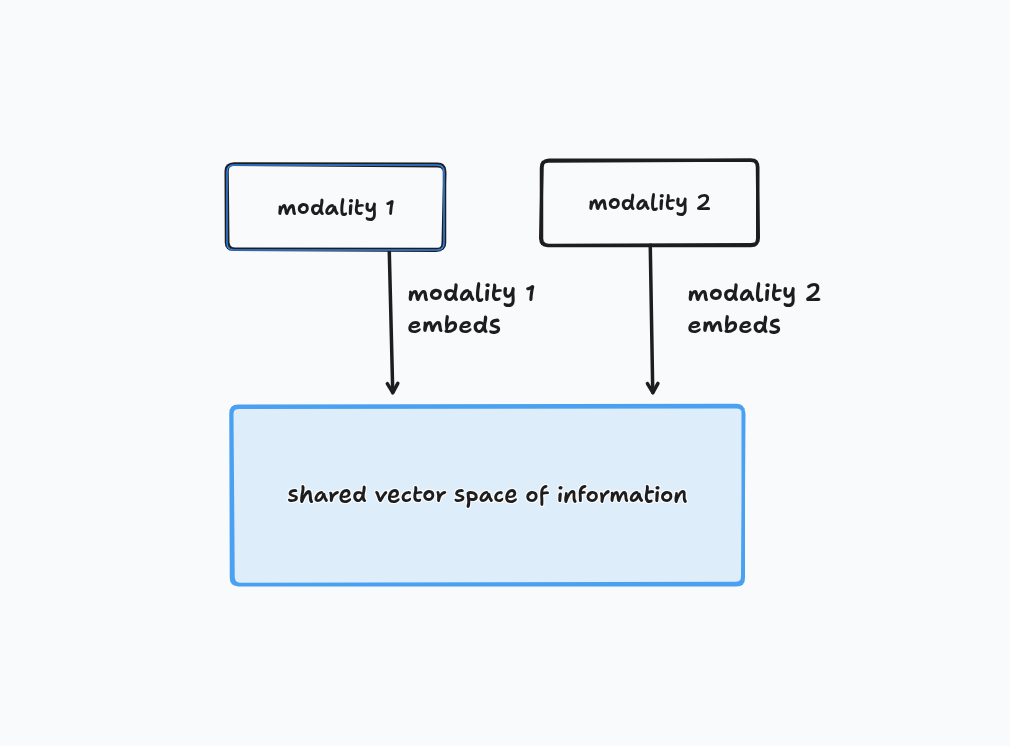
We embed each modality’s information in a vector and store those vectors in a shared vector space.
It looks something like this.
Now how does this help us?
This helps us because now we can use one modality to query for a second modality’s information.
If two pieces of information are similar, their vectors in the shared space will be close together, and we can use cosine similarity or other measures to figure out the k-best vectors.
This is the core idea behind vector space retrieval:
If two pieces of information are similar, they’ll be closer in the shared vector space no matter their modality.
but how?
Let’s think about what we need.
We need a way to embed two different modalities into the same vector space. But images and text don’t share any obvious common structure — an image is a grid of pixel values, while text is a sequence of words. There’s no natural bridge between them.
So instead of looking for a bridge that already exists, we build one. We take two separate models — one that turns images into vectors, one that turns text into vectors — and train them together, with one specific goal: make sure that when an image and its caption really do belong together, their vectors end up close in space. And when they don’t belong together, push their vectors apart.
This is exactly what CLIP (Contrastive Language-Image Pre-training) does. What CLIP is:
- an image encoder (a Vision Transformer - ViT) that turns an image into a vector
- a text encoder (a regular transformer) that turns a sentence into a vector
At no point do these two models talk to each other while they’re running. They’re trained together, then used completely independently. All the “connection” between text and images lives entirely in the weights that each encoder ends up with after training.
Deeper dive: how do you actually train this? This is where contrastive training comes in. Take a batch of, say, 256 (image, caption) pairs, scraped from the internet; these pairs already exist naturally, no manual labeling needed. Embed all 256 images and all 256 captions. Now you’ve got a 256×256 grid of possible pairings, and only 256 of them (the diagonal) are actually correct.
Training pushes the model to make those correct pairs score high similarity, and every other combination score low similarity: like “out of these 256 captions, which one matches this image?” and “out of these 256 images, which one matches this caption?”
Once this training is done, you throw the training process away and keep only the two encoders as frozen functions:
image_encoder(pixels) → vector
text_encoder(text)     → vector
So, that’s how we can embed information in a shared space.
Think about it. The two modalities NEVER TALK TO EACH OTHER.
During training, the only thing they share is a loss function.
A rough outlook into how a model like this is trained
- Take a batch of (image, caption) pairs.
- Run every image through the image encoder → get vectors.
- Run every caption through the text encoder → get vectors. (These two steps are independent, i.e., encoder A doesn’t need encoder B’s output to do its job.)
- Now bring the outputs together: compute the similarity between every image vector and every caption vector, and compute one loss number from that whole grid. That loss tells us “how well did the correct pairs score higher than the incorrect ones?”
- That single loss number is used to compute gradients that flow backward into both encoders simultaneously. Backprop reaches into the image encoder’s weights AND the text encoder’s weights, adjusting both, because both contributed to the final similarity scores.
let’s build a basic text-to-image system
DISCLAIMER: we’re not training, just inferencing and using model checkpoints.
What we need:
- A vector database: we will use lancedb to store the embedded vectors
- Images to query from: I downloaded some random images off the internet
- A model that does embeddings for us: CLIP ViT-B-32
- Two files:
build_index.pyandquery.py
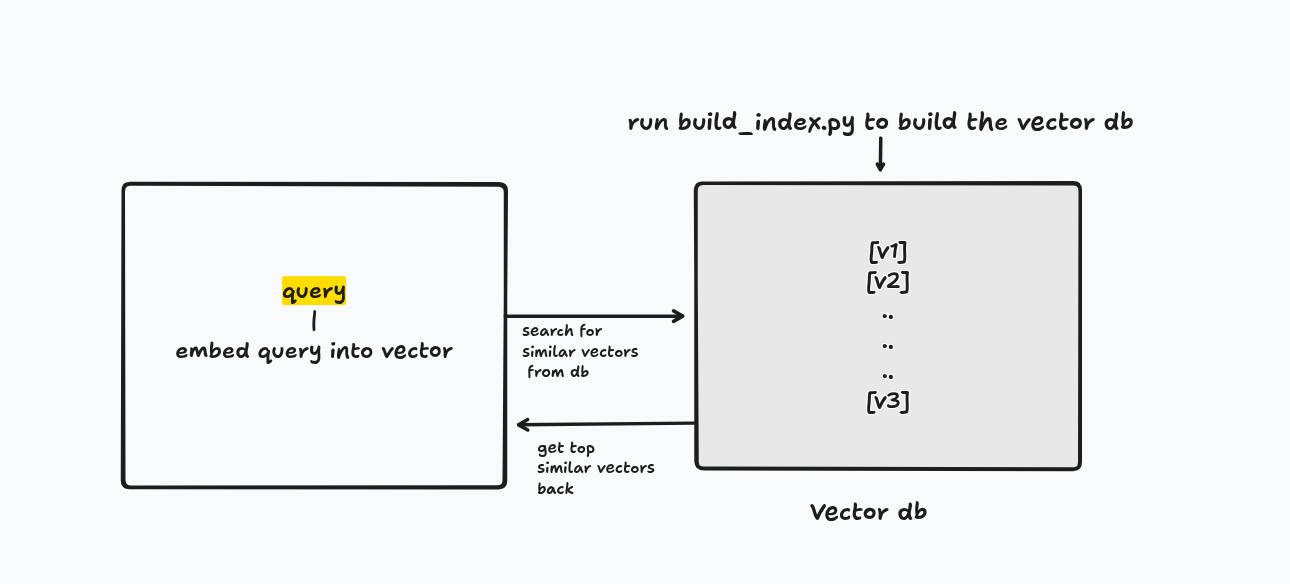
query.py
# imports
import os
import torch
import open_clip
import lancedb
from PIL import Image

# define
device = 'cuda' if torch.cuda.is_available() else 'cpu'
DB_PATH = "clip_db"
TABLE_NAME = "images"

# globally define the model and tokenizer
model, _, preprocess = open_clip.create_model_and_transforms(
    "ViT-B-32", pretrained="laion2b_s34b_b79k"
)
model = model.to(device).eval()
tokenizer = open_clip.get_tokenizer("ViT-B-32") # tokenize the query


def embed_text (query: str) -> list[float]:
    '''
    tokenize the query into a vector
    '''
    tokens = tokenizer([query]).to(device)
    with torch.no_grad():
        vec = model.encode_text(tokens)
        vec = vec / vec.norm (dim=-1, keepdim=True) # l2 norm
    return vec.squeeze(0).cpu().tolist()


def search (query: str, k: int = 5):
    '''
    search from db the closest vectors
    '''
    db = lancedb.connect(DB_PATH)
    table = db.open_table(TABLE_NAME)
    query_vec = embed_text(query)
    results = table.search(query_vec).limit(k).to_list()
    return results

if __name__ == "__main__":
    query = input("search> ")
    results = search(query)
    for r in results:
        print(f"{r['_distance']:.4f}  {r['path']}")
    try:
        result_image = Image.open(results[0]['path']) # show the best results - meaning the least _distance attribute
        result_image.show()
    except Exception as e:
        print(f'error is : {e}')
build_index.py
# the same imports...
import os
# ...


def embed_image(path: str) -> list[float]:
    '''
    embed image to a vector embedding
    '''
    img = Image.open(path).convert("RGB")
    tensor = preprocess(img).unsqueeze(0).to(device)
    with torch.no_grad():
        vec = model.encode_image(tensor)
        vec = vec / vec.norm(dim=-1, keepdim=True)
    return vec.squeeze(0).cpu().tolist()


records = []
for fname in sorted(os.listdir(IMAGE_DIR)):
    # in the image dir, embed all the files that are jpg, jpeg or png
    if not fname.lower().endswith((".jpg", ".jpeg", ".png")):
        continue

    path = os.path.join(IMAGE_DIR, fname)
    vector = embed_image(path)
    records.append({"path": path, "vector": vector})
    print(f"embedded {fname} (dim={len(vector)})")

db = lancedb.connect(DB_PATH)
db.create_table(TABLE_NAME, data=records, mode="overwrite")
print(f"\nIndexed {len(records)} images into '{DB_PATH}/{TABLE_NAME}'")
If everything works fine, you should see an output like this:

Mind you, the model doesn’t know from the name of the file that it is a cat the user is asking for.
It is the embedding that tells us which file has the most similar embedding.
conclusion
Today we looked at text-to-image retrieval.
We didn’t discuss some VERY interesting details as to how there are optimizations in vector dbs, too.
Like the indexing techniques, etc.
We’ll discuss them in some other article.
No text was AI-generated. Code was written with the help of LLMs.
As always,
Thanks for reading
~ Aayushya